Mastering ChatMate: Your AI Chatbot Dashboard V2 Guide
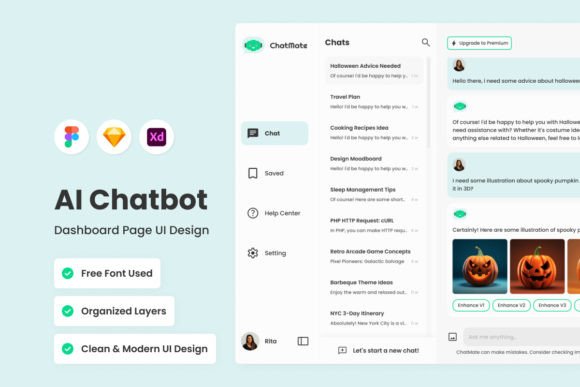
For designers, entrepreneurs, and creators, the dashboard is the cockpit. It is where strategy meets execution. When building conversational AI, you need more than just code; you need a visual interface that clarifies data and streamlines management. ChatMate - AI Chatbot Dashboard V2 is not just a collection of screens; it is a comprehensive design system built to handle the complexity of modern AI interactions with clarity and precision. If you are looking to deploy a chatbot solution that looks professional and functions intuitively, this dashboard provides the foundation you need.
The Architecture of Modern Conversational AI
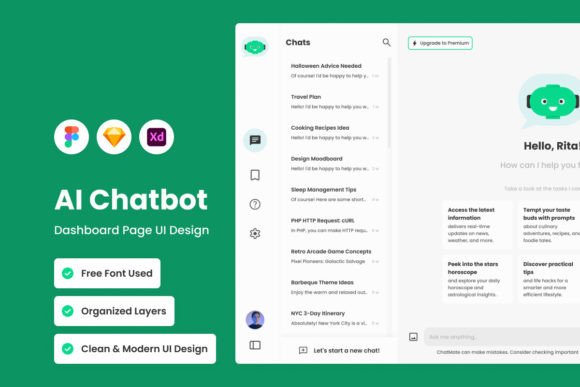
ChatMate V2 represents a significant leap in how we visualize chatbot management. It moves away from cluttered, spreadsheet-like interfaces and embraces a clean, modular layout. The visual personality of this dashboard is defined by its balance. It uses ample white space to prevent cognitive overload, paired with a strategic use of color to guide the user's eye to key metrics. Whether you are viewing the desktop version or the mobile iteration, the design remains consistent, ensuring that you can manage your bot's performance from anywhere without sacrificing usability.
The aesthetic is distinctly modern, favoring flat design elements with subtle depth through shadows and layering. This is not just about looking good; it is about functionality. The layers are well-organized and neat, making it easy for developers and designers to customize the file in Figma, Sketch, or Adobe XD. For the business owner, this translates to a professional frontend that builds trust with users. When a customer interacts with your bot, or when you are analyzing that interaction in the backend, the interface feels polished and reliable.
Visualizing Data and User Behavior
The core strength of ChatMate V2 lies in its customizable analytics. In the world of conversational AI, data is king, but raw data is useless without context. This dashboard excels at turning conversation trends into visual stories. You can dive deep into user behavior, tracking everything from peak interaction times to drop-off points in the conversation flow. The design allows for clear data visualization, using charts and graphs that are easy to read at a glance. This helps marketers and content creators adjust their strategies in real-time, ensuring the chatbot remains a useful tool rather than a static page element.
Furthermore, the dashboard includes global text and color styles. This feature is crucial for maintaining brand identity. You can easily swap out the default palette for your specific brand colors and update the typography to match your existing style guides. This level of customization ensures that the chatbot dashboard feels like a natural extension of your brand, rather than a third-party add-on. It is a practical solution for anyone serious about web design and cohesive digital presence.
Integrating ChatMate into Your Creative Workflow
One of the most practical aspects of ChatMate V2 is its compatibility. It is designed to work seamlessly with industry-standard tools like Figma, Sketch, and Adobe XD. This means you are not locked into a specific ecosystem. If you are a designer who prefers vector-based workflows, the included free vector icons and organized layers make customization a breeze. You can adjust the spacing, typography, and layout to fit specific project requirements without breaking the structure of the file.
The use of open-source fonts is another highlight. This removes the barrier of expensive licensing for the design assets themselves, allowing you to allocate your budget toward the actual development of the chatbot or marketing campaigns. The typography choices within the dashboard are functional and legible, prioritizing readability across different screen sizes. This focus on modern typography ensures that the interface remains accessible to a broad audience, which is a key component of effective UX design.
Practical Applications for Business and Design
For the entrepreneur or small business owner, ChatMate V2 offers a tangible way to professionalize customer service. Instead of a basic text box, you are providing a structured environment for interaction. The dashboard allows you to monitor conversations and refine the bot's personality. For designers, this is a versatile asset. You can use the dashboard layout as a base for editorial design projects or packaging design mockups where data visualization is required. The clean lines and structured grids make it adaptable for various creative font pairings and layout experiments.
Consider the implications for social media graphics and marketing. By analyzing the trends within ChatMate V2, you can identify what your audience cares about. If the bot logs a high volume of questions about a specific product feature, that is a signal for your content team to create educational content around that topic. The dashboard serves as a feedback loop, connecting user behavior directly to your content strategy.
Choosing the Right Design Assets
When evaluating design assets like ChatMate V2, it is important to look beyond the surface. While the visual appeal is high, the real value lies in the organization of the file. A well-organized file saves time during the implementation phase. Check for consistency in the naming of layers and the use of components. In ChatMate V2, the components are reusable, meaning if you change a button style in one place, it updates throughout the entire dashboard. This consistency is vital for maintaining a professional look and feel.
For those considering commercial use, the licensing is straightforward. The assets are designed for use in your projects, allowing you to build and sell products that utilize this interface. However, always review the specific terms regarding resale of the source files. The goal is to use these assets to build your own brand identity, not to resell the template itself. By treating ChatMate V2 as a foundational tool, you can create unique, high-value experiences for your clients or your own business. It is an investment in efficiency and quality that pays dividends in the long run.